Orders and tables
Know where every table stands without asking anyone.
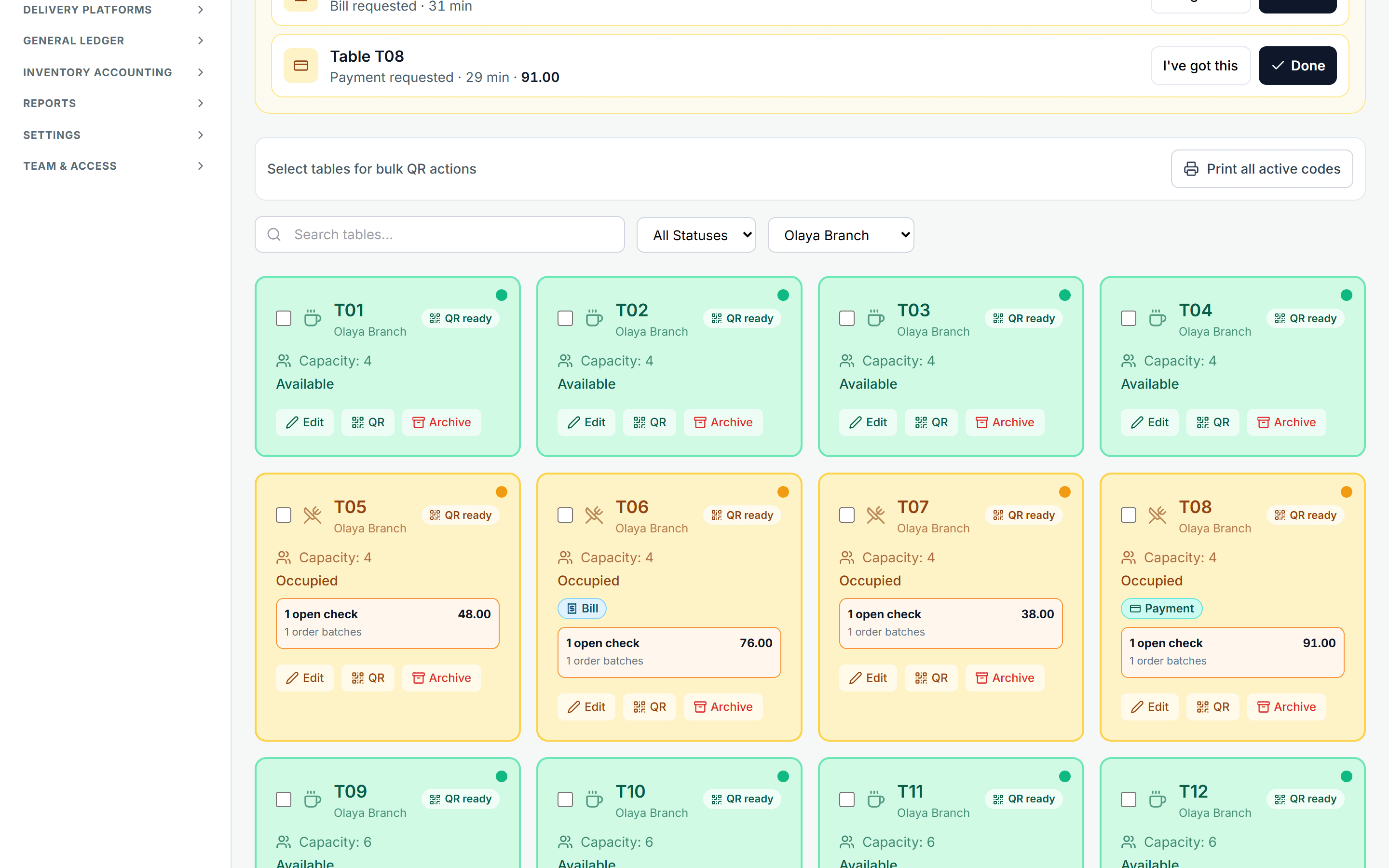
A table board shows each table's state live — available, occupied with an open check, or a guest asking to pay — derived from the checks themselves, with a separate check per guest and a QR code on every table.
What happens today
You ask a waiter what is happening at table seven and they go and check. A table that finished sits unturned because nobody noticed.
What changes with MENUVA
The table board shows each table's state live: available, occupied with an open check, or a guest asking to pay — derived from the checks themselves, never typed by anyone. An order has a lifecycle from open to closed, and a guest can add a further order to the same table without starting again.
Table QR flow
From scanning the code to the invoice
01Scan the code
With the phone camera, no app.
Leaves: Table T010
02The menu
Photos, prices and modifiers, in Arabic or English.
03The guest orders
With their Saudi mobile number, which opens their check at the table.
Leaves: Check open
04The restaurant's workflow
Staff confirm the order, and it appears on the kitchen screen.
Leaves: Preparing
05The invoice
The guest asks to pay, staff take payment: one simplified tax invoice for their check.
Leaves: Settled
No online payment from the menu: staff take payment by cash, card or transfer.
Tables that turn faster, and service that forgets nobody.
You know the state of the room without asking anyone.
A table frees only when its last check is settled.
Follow-on orders in the same sitting, without starting over.
What it covers
- Live status
- Every table and its state on one screen.
- Order lifecycle
- Open to closed, on a clear record.
- Follow-on order
- On the same table, in the same sitting.
- A QR code per table
- Printed and fixed to the table.
Part of the same workflow
- QR ordering →The guest scans the table's code with their phone camera and orders with their Saudi mobile number — no app, no account. The order reaches the till against that table for staff to confirm, then goes to the kitchen; each guest keeps a separate check settled with one invoice.
- Point of sale →A touch till that sells inside an open shift: dine-in, takeaway and delivery from one screen, prices and VAT calculated by the server, and payment by cash, card or transfer — or split between them.
- Kitchen display →One kitchen screen shows till orders and QR orders together, ordered by how long they have waited, and the team moves an order — or a single item on it — through the preparation states to served.
How does QR ordering work?
The guest scans the table's QR code with their phone camera and orders from the menu with their Saudi mobile number — no app and no account — and the order reaches the till against that table.
Staff confirm the order according to the restaurant's settings, and it goes to the kitchen. Each guest at the table has their own open check that later orders join, and can call a waiter or ask for the bill or the card machine. Payment is taken by staff — there is no online payment from the menu — and settling a check produces one invoice for it.
Every MENUVA answer →Try it on your restaurant.
14 days free, with no bank card.