Kitchen display
Clear tickets instead of paper lost in the rush.
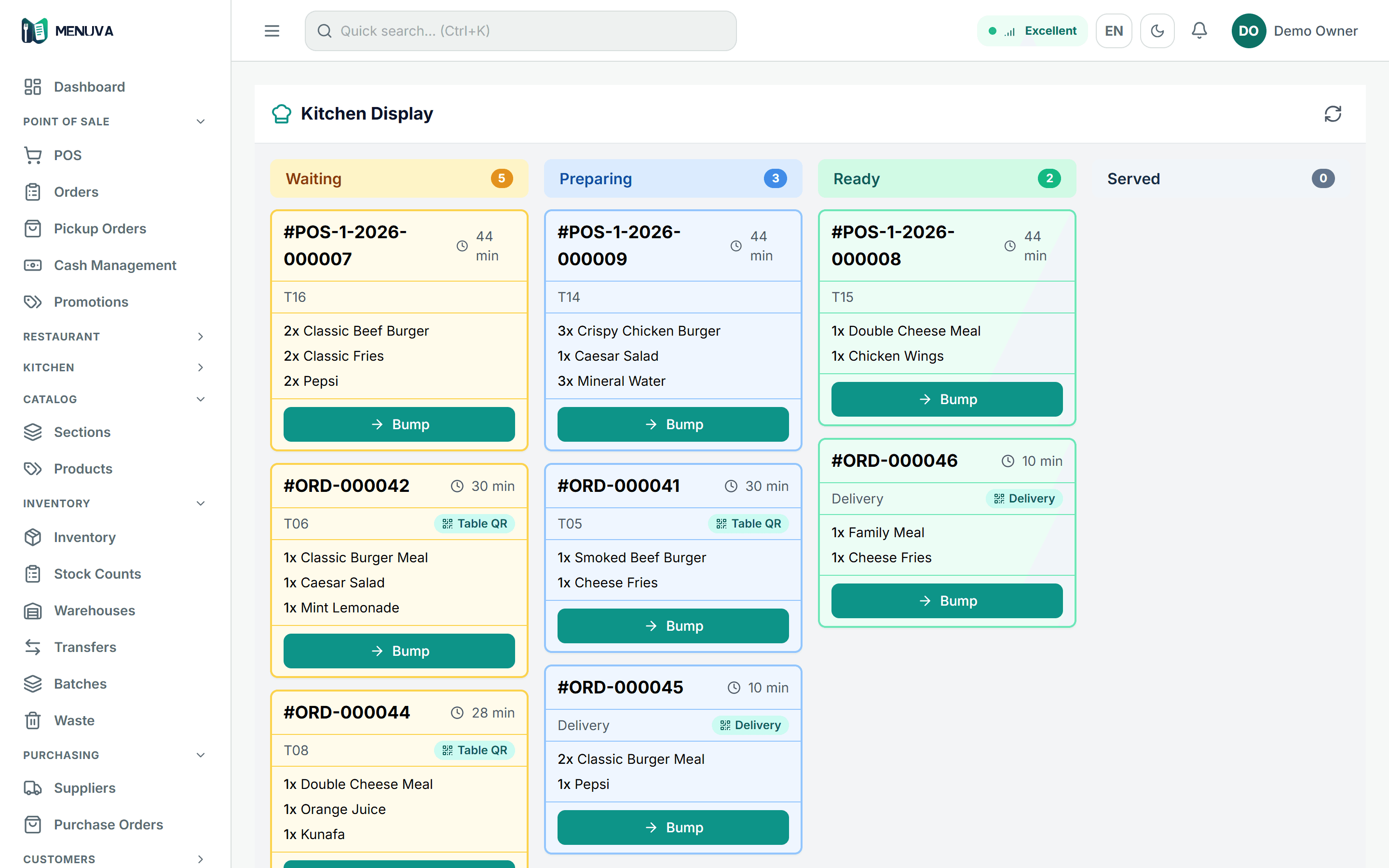
One kitchen screen shows till orders and QR orders together, ordered by how long they have waited, and the team moves an order — or a single item on it — through the preparation states to served.
What happens today
A paper ticket falls off the rail, or gets misread, or sits late with nobody noticing. And there is no way to see which table has been waiting, and for how long.
What changes with MENUVA
Orders appear on the kitchen screen ordered by how long they have waited — oldest first, because a table waiting ten minutes matters more than one that ordered a second ago. The team moves a ticket — or a single item on it — through the preparation states to served.
POS flow
From opening the shift to the journal entry
01Open the shift
With a declared cash float.
Leaves: Shift open
02The sale
Dine-in, takeaway or delivery; price and VAT from the server.
03Payment
Cash, card or transfer, or split.
Leaves: Paid
04The kitchen
The ticket on the kitchen screen, longest-waiting first.
05Accounting
Revenue, VAT and cost of sales post automatically.
Leaves: Posted
And at close: a cash count, with a manager-approved reason for any difference.
Faster plates, fewer mistakes, and a kitchen that knows its own order of work.
The table that has waited longest is served first.
No paper ticket lost or misread.
The guest's modifiers reach the kitchen as ordered.
What it covers
- Oldest first
- Sorted by actual waiting time, not arrival.
- Preparation state
- Step by step through to ready.
- Waiting time on the ticket
- Each ticket shows the minutes waited, with the guest's modifiers.
- QR and till together
- The kitchen sees the order whatever its source.
Part of the same workflow
- Point of sale →A touch till that sells inside an open shift: dine-in, takeaway and delivery from one screen, prices and VAT calculated by the server, and payment by cash, card or transfer — or split between them.
- QR ordering →The guest scans the table's code with their phone camera and orders with their Saudi mobile number — no app, no account. The order reaches the till against that table for staff to confirm, then goes to the kitchen; each guest keeps a separate check settled with one invoice.
- Product →
Does the kitchen display route orders to separate stations?
No. The screen is one board for the branch, ordered by waiting time. You can define kitchen stations and their categories, but routing items to stations applies to printed tickets through a printing client that is not released yet.
Try it on your restaurant.
14 days free, with no bank card.